AI billing
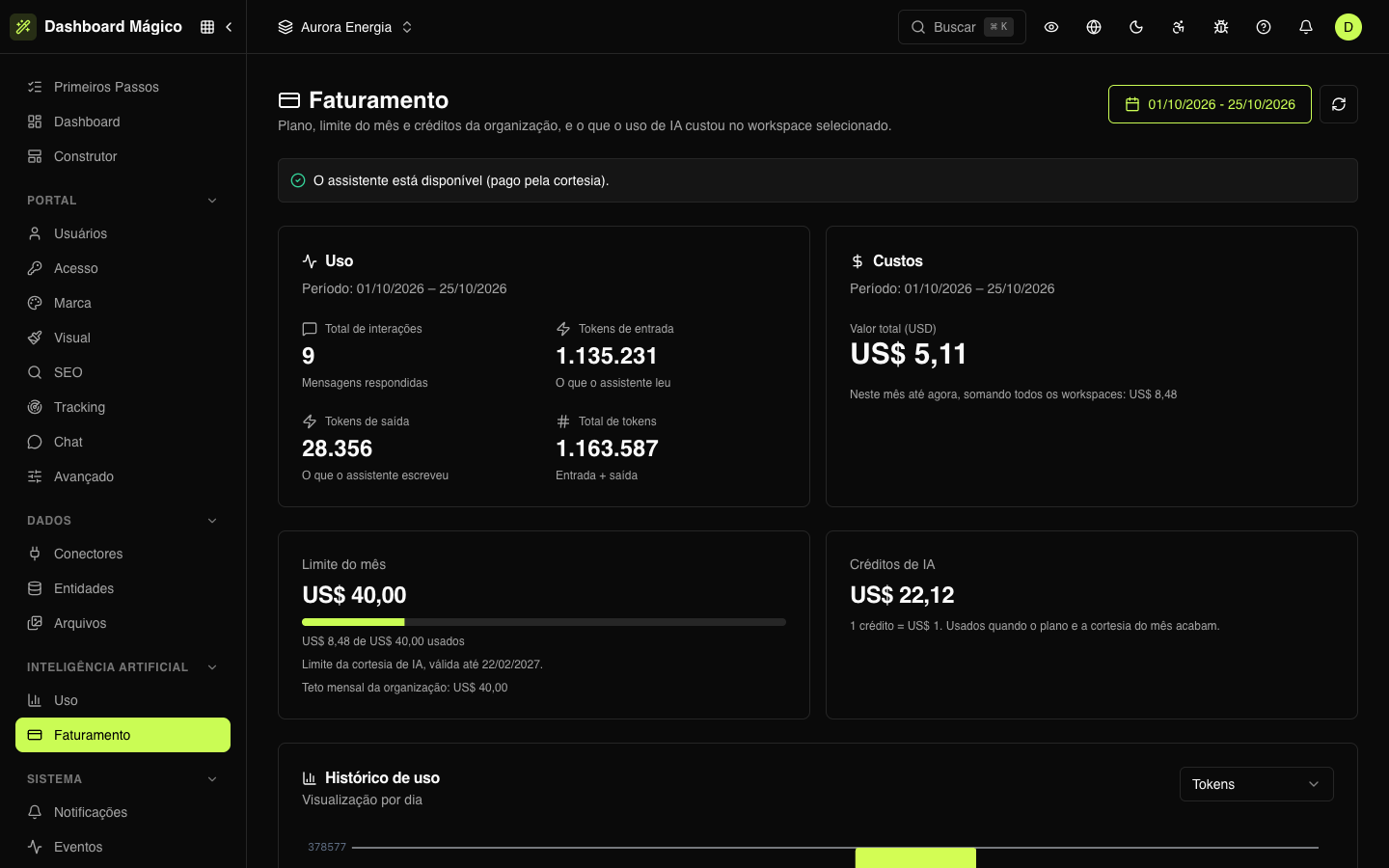
In Artificial Intelligence › Billing (/dashboard/ai/billing) you can see whether the AI assistant is available, who is paying for usage, how much of the monthly limit has been spent and how many credits the organization has.
What belongs to the organization and what belongs to the workspace
- The organization's: the availability notice, the monthly limit, the month-to-date spend and the credits. They apply to all workspaces together.
- The active workspace's: the Usage and Costs cards and the Usage history, always for the period chosen in the date picker (by default, the current month).
Who pays for usage
Every interaction with the assistant is paid for by one of these sources, in this order:
- Plan — the AI plan your organization has subscribed to, up to its monthly limit.
- Courtesy — a monthly allowance offered by Kobana, with an expiration date.
- Credits — the AI credits your organization has bought. They only come into play when the plan and the courtesy don't cover the usage, including after the month's limit is reached.
Credits come last on purpose: that way you don't spend what you already paid for while you still have an allowance that renews every month.
Assistant availability
The notice at the top of the screen says whether the assistant can answer right now and who will pay for the next interaction:
| Notice | What it means |
|---|---|
| The assistant is available (paid by your plan) | The plan covers the usage. |
| The assistant is available (paid by the courtesy) | The courtesy covers the usage. |
| The assistant is available (paid by credits) | The plan and the courtesy no longer cover it; credits are paying. |
| No AI credits left | No plan or courtesy is covering usage, and the credit balance has run out. |
| The monthly AI limit has been reached | The month's spend hit the limit, and there are no credits to continue. |
| We can't confirm your AI plan right now | A temporary failure while checking the plan. Try again in a few minutes. |
When the assistant is unavailable, the Builder chat refuses new messages until the situation changes.
Usage and costs for the period
- Usage: total interactions (messages answered), input tokens (what the assistant read), output tokens (what it wrote) and total tokens.
- Costs: the total amount for the period, in US$, in the active workspace. Right below it, the month-to-date spend across all workspaces — this is the number that counts toward the limit.
The day-by-day and interaction-by-interaction detail is in AI usage.
Monthly limit
The Monthly limit card shows the spending ceiling that applies right now, a bar with how much has been used and where the limit comes from:
- Your AI plan's limit or The AI courtesy's limit (with the expiration date, when there is one);
- Organization monthly cap, when set — a maximum amount for the month's spend, even if the plan or the courtesy would allow more.
When both exist, the lower one applies. With neither, the card shows No limit set. Once the limit is reached, usage continues only if there are credits. The limit and the cap are set with Kobana; this screen only shows the values.
AI credits
The AI credits card shows the organization's balance: 1 credit = US$ 1. The balance goes down as credits pay for interactions and goes up when the organization buys more. To buy credits, talk to Kobana.
Usage history
A daily chart for the active workspace, with the maximum and the total for the period, and a table with the amount for each day. Choose what to see in the selector next to the title: Tokens, Interactions or Amount (USD).
Example
The Aurora organization has a courtesy of US$ 50 per month and a monthly cap of US$ 40. That is why the month's limit is US$ 40.00 — the lower of the two. In October, the workspaces added up to US$ 8.48, of which US$ 5.11 in Aurora Energia. While the courtesy covers usage, the notice says "paid by the courtesy", and the credits (US$ 22.12, from a US$ 25 purchase) are kept for when it doesn't.