Publishing and versions
Everything you change in the Builder goes into a draft. Your customers only see the changes when you publish, and each publication becomes a numbered version (v1, v2, v3…) kept in the history.
Draft and live version
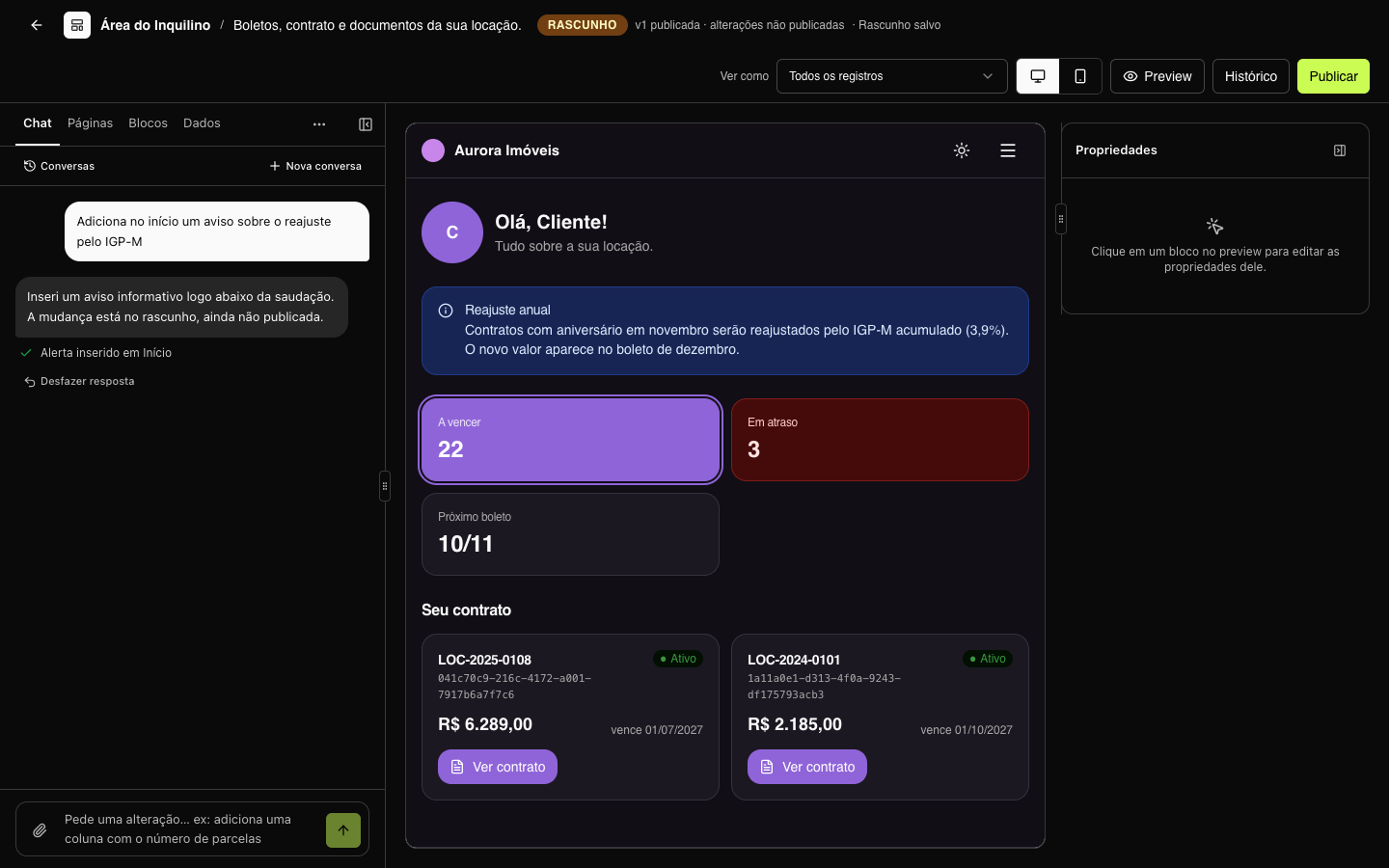
The top bar shows where you are:
| Status | What it means |
|---|---|
| LIVE | The draft is the same as the published version. Next to it: v1 published 2 months ago, for example. |
| DRAFT | There are changes that have not been published yet: v1 published · unpublished changes. |
| never published | The portal has not had any version yet. |
In the Pages tab, pages created since the last publication have the new mark, and modified ones, changed.
The draft includes the pages and their blocks, the menu order, the colors and the default SEO settings of the pages. Entities, data sources and the Portal settings (brand, access, language, SEO…) are not part of the draft: they apply right away. The exception is Portal › Visual, which edits the same draft colors.
In Aurora Imóveis, v1 ("Tenant Area launch") is live, and the draft has two changes not yet published: an annual adjustment notice on the Home page and the new Inspections page, with the scheduling form.
Publish
- Click Publish, in the top bar.
- Review the Changes since v1 list (or Draft changes, on the first publication).
- Write a Version note — for example, Inspections page and adjustment notice. It appears in the history and helps you find the version later.
- Click Publish now.
The portal changes immediately at its address (the custom domain or the portal address, configured in Portal › Access). The previous version stays in the History.
You can also ask the chat to publish: it opens the same window, with the suggested note, and you confirm.
History
Click History in the top bar. The right panel lists, from newest to oldest:
- Current draft — when there are unpublished changes, with a summary of what changed.
- Each published version — number, how long ago, who published and the note. The live version has the LIVE mark.
In the Aurora Energia portal, for example, the history has v1 ("First version: home and invoices"), v2 ("Invoice detail and tax invoices") and v3 ("Help page with FAQ and contact form"), which is live.
Go back to a previous version
Each version in the history has two buttons:
| Button | What it does |
|---|---|
| Restore to draft | Copies the version's pages and blocks to the draft. Nothing changes in the portal until you publish — you can adjust first. |
| Put live | Publishes that version again, right away, with the next number. If v3 is live and you put v1 live, it comes back as v4 ("Rollback to v1"). The draft stays as it is. |
The history never loses versions: the one that was live stays listed, and you can go back to it whenever you want. When you put a version live, its colors come back with it.